A twelve-servo robot dog from CAD to MuJoCo and Gazebo
A twelve-servo robot dog can go from a model to a robot that stands in MuJoCo and Gazebo without writing any XML: build the body from two plates on standoffs, draw one leg round its three servos, mirror it and copy it for the other three, joint each leg at the hip and the knee, and export with a floating base. This one is built round twelve Feetech STS3215 serial-bus servos and carries a Raspberry Pi 5, a BNO085 IMU and a RealSense D435i from the parts library, and its export is a ROS 2 package with URDF, SDF and MJCF. Below are how it was modelled, the export settings, the commands for each simulator, what we checked, and the files to download.
What is the dog?
Four legs of three joints each, and every joint a servo: a hip that rolls the leg out to the side, a hip that swings it forward and back, and a knee. The body is two carbon plates, 230 by 104 mm and 3 mm thick, on six standoffs, with the four hip roll servos clamped between them at the corners. A printed tray under the bottom plate holds a 3S LiPo, the Raspberry Pi 5 stands on its own standoffs on top, the BNO085 IMU sits between the plates in the middle and the RealSense D435i looks out from the front.
A leg is three printed parts: a hip bracket on the roll servo’s horn that holds the pitch servo, a thigh on the pitch servo’s horn with a slot the knee servo slides into, and a shin on the knee servo’s horn that ends in a ball foot 22 mm across.
The thigh and the shin are 100 mm long each and stand at 36.87° to the vertical, the angle of a 3-4-5 triangle. On a front leg the knee is 60 mm behind the hip and 80 mm below it, and the foot 60 mm in front of the knee and 80 mm below that, so the foot stands right under the hip. The hind legs are the front ones turned half a turn about the vertical, so their knees point forward, as a dog’s do. With every joint at zero, the hips’ axes are 171 mm above the ground.
Watch it being built
The whole dog was made one tool at a time, and how is recorded as a replay. Open the dog’s replay and the editor builds it in front of you, each sketch, extrusion, part, joint and setting as a person makes it, then exports it.
How was it modelled?
- The body. The plate is sketched once, a rounded rectangle with two long slots, a short one and the screws’ holes, and extruded twice, at the bottom and the top. The standoffs, the IMU’s and the Pi’s posts and the battery’s tray are extruded into the same part,
base_link, which is given carbon fibre, 1600 kg/m³. It is pinned, so it is the root link. - The electronics. The four roll servos, the LiPo, the Pi, the IMU and the camera come from the parts library (Insert part), each placed inside
base_link. A part inside another that no joint moves rides with it, so all of them belong to the body’s link. The library parts carry their makers’ masses, 55 g for each servo1; the library gives none for the Pi 5, so it was set by hand to 46 g. - The front left leg. Each printed part is drawn round its servo: the hip bracket is a cup round the pitch servo’s case, the thigh has the knee servo’s slot, a lightening slot and rounded edges, and the shin ends in the ball foot. All three are PLA, 1240 kg/m³.
- The other three legs. The front right leg is the front left one’s mirror image, and the hind legs are copies of the front ones turned half a turn about the vertical, servos and all.
- Twelve joints. Each is a revolute joint made where the parts stand (As-built joint), on its servo’s axis, between the part on the servo’s horn and the part that holds the servo, with the limits in the table. The pose the dog was modelled in is every joint’s zero.
| Joint | Axis at zero | Range | Positive is |
|---|---|---|---|
fl_hip_roll | −X | −35° to 20° | the leg rolling in, under the body |
fr_hip_roll | −X | −20° to 35° | the leg rolling out |
rl_hip_roll | +X | −20° to 35° | the leg rolling out |
rr_hip_roll | +X | −35° to 20° | the leg rolling in, under the body |
fl_hip_pitch | +Y | −100° to 25° | the leg swinging back |
fr_hip_pitch | −Y | −25° to 100° | the leg swinging forward |
rl_hip_pitch | +Y | −25° to 100° | the leg swinging back |
rr_hip_pitch | −Y | −100° to 25° | the leg swinging forward |
fl_knee | +Y | −85° to 70° | the knee straightening |
fr_knee | −Y | −70° to 85° | the knee folding |
rl_knee | +Y | −70° to 85° | the knee folding |
rr_knee | −Y | −85° to 70° | the knee straightening |
X points forward, Y to the dog’s left and Z up, and each joint turns right-handed about its axis, given as it points with every joint at zero. The legs are fl, fr, rl and rr: front left, front right, rear left and rear right.
Every leg can make the same moves: its hip rolls 20° in and 35° out, a front hip swings 100° forward and 25° back and a hind one 100° back and 25° forward, and every knee folds 85° and straightens 70°, to 4° short of straight. What a positive angle does differs from leg to leg. The front left and rear right legs’ hip rolls and knees turn one way for it and the front right and rear left legs’ the other, and a hip pitch swings a left leg back and a right leg forward. A controller that moves all four legs alike takes each joint’s sign from the table.
How was it exported?
Open Export in the header and choose Export Robot (URDF / MJCF / SDF)…. The panel finds the IMU and the camera by itself, since a library part that is a sensor comes marked as one. For the dog:
- Name:
robot_dog, the ROS 2 package’s name. - Floating base, ticked: a dog is not bolted down. In MJCF the root body gets a free joint, in SDF it is not welded to the world, and the ROS 2 package’s Gazebo launch puts it free on the ground, with
fixed:=trueto weld it where it stands in the design. With a fixed base MuJoCo reads no acceleration on the IMU, since the body it sits on never moves. - Effort 2.9 N·m and Velocity 4.7 rad/s, into every joint’s limits: the 12 V STS3215’s peak stall torque, 30 kg·cm, and its no-load speed, 0.222 s per 60°1, as for the desktop arm.
- Formats: URDF, MJCF, SDF and the ROS 2 package.
The checks found nothing to warn about. The panel’s one note names the sixteen parts whose masses are given, the twelve servos, the LiPo, the Pi, the IMU and the camera, each of which gets its shape’s inertia scaled to that mass. The links weigh:
| Link | Mass | What it is |
|---|---|---|
base_link | 739.7 g | the plates, the standoffs, the posts and the tray, 230 g of carbon fibre; the four roll servos, 220 g; the LiPo, 169 g; the camera, 72 g; the Pi, 46 g; the IMU, 2.5 g |
each _hip | 85.8 g | the printed bracket and the pitch servo |
each _thigh | 91.5 g | the printed thigh and the knee servo |
each _shin | 23.1 g | the printed shin and its ball foot |
| the dog | 1541 g |
The standoffs and the tray are in the same part as the plates, so they weigh as carbon fibre too. To weigh them as aluminium and PLA, make them parts of their own, inside base_link, and give each its material.
With the four formats ticked, Export zip saves one zip:
robot_dog/
  robot_dog.urdf  urdf/robot_dog.urdf      URDF: meshes beside it, or by package://
  package.xml  CMakeLists.txt  launch/  config/  rviz/  worlds/  scripts/
                                           the ROS 2 package
  robot_dog.xml  scene.xml                 MJCF, and a scene with a floor and lights
  model.sdf  model.config  world.sdf       SDF, for Gazebo without ROS
  meshes/                                  113 STL files, one per link and colour
  README.md                                the commands for each
It comes to 1.0 MB. CAD to URDF says what each file holds.
See it in RViz
On Ubuntu 24.04 with ROS 2 Jazzy, unpack the zip into a workspace, build it and launch the display:
sudo apt install ros-dev-tools        # colcon, once
source /opt/ros/jazzy/setup.bash
mkdir -p ~/ros2_ws/src
python3 -m zipfile -e robot_dog.zip ~/ros2_ws/src/
cd ~/ros2_ws
colcon build --packages-select robot_dog
source install/setup.bash
ros2 launch robot_dog display.launch.py
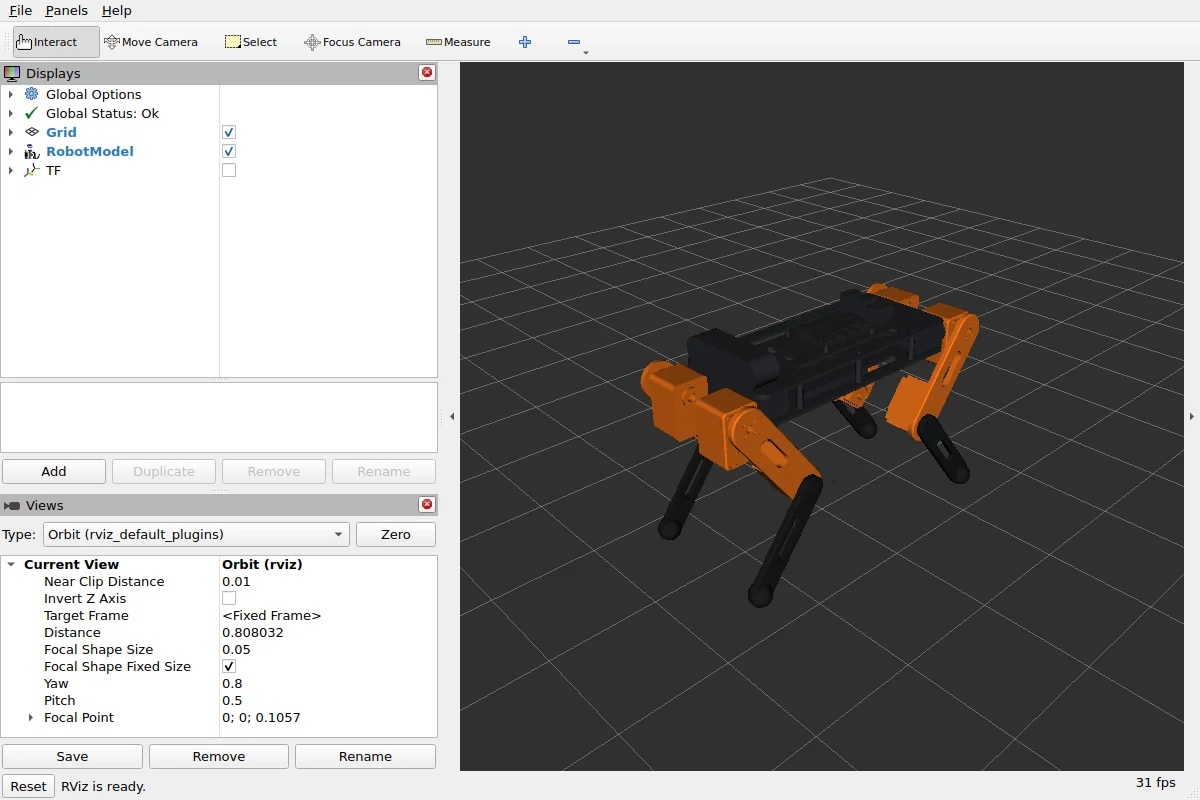
RViz opens with the dog and its frames, beside a window with a slider for each of the twelve joints. The commands assume ROS 2 Jazzy’s desktop install, ros-jazzy-desktop, which brings RViz and the sliders. Before you share the package, put your name and a licence in its package.xml, which the export leaves as placeholders.
Run it in Gazebo
Gazebo Harmonic and its bridge to ROS 2 come with ros-jazzy-ros-gz. In a new terminal:
sudo apt install ros-jazzy-ros-gz     # once
source /opt/ros/jazzy/setup.bash
source ~/ros2_ws/install/setup.bash
ros2 launch robot_dog gazebo.launch.py
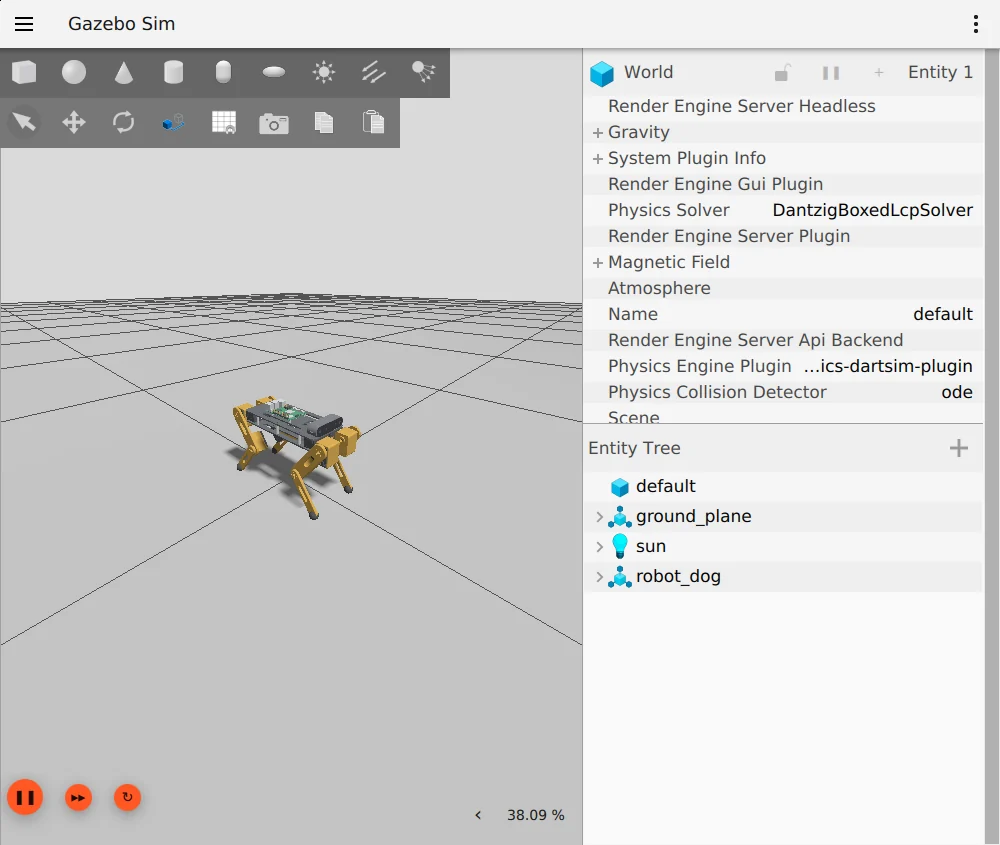
Gazebo opens with the dog free on the ground, and RViz beside it shows the robot, its frames and its sensors. Every joint is held by a position servo, so the dog stands on its legs at zero; fixed:=true welds its body to the world instead, where it stands in the design. To move a joint, publish an angle in radians on its command topic, as the package’s README lists them. This one folds the front left knee by 0.5 rad, 29°:
ros2 topic pub --once /fl_knee/cmd_pos std_msgs/msg/Float64 "{data: -0.5}"With demo:=true each joint swings through its range in turn, a test of the joints rather than a gait. The IMU publishes on /imu/data at 400 Hz. The camera, an RGB-D camera of 640 by 374 pixels with an 87° field of view at 30 Hz, publishes on /camera/image, /camera/depth_image, /camera/points and /camera/camera_info.
Run it in MuJoCo
MuJoCo needs only Python. Install it with pip install mujoco, then, in the folder where you unpacked the zip:
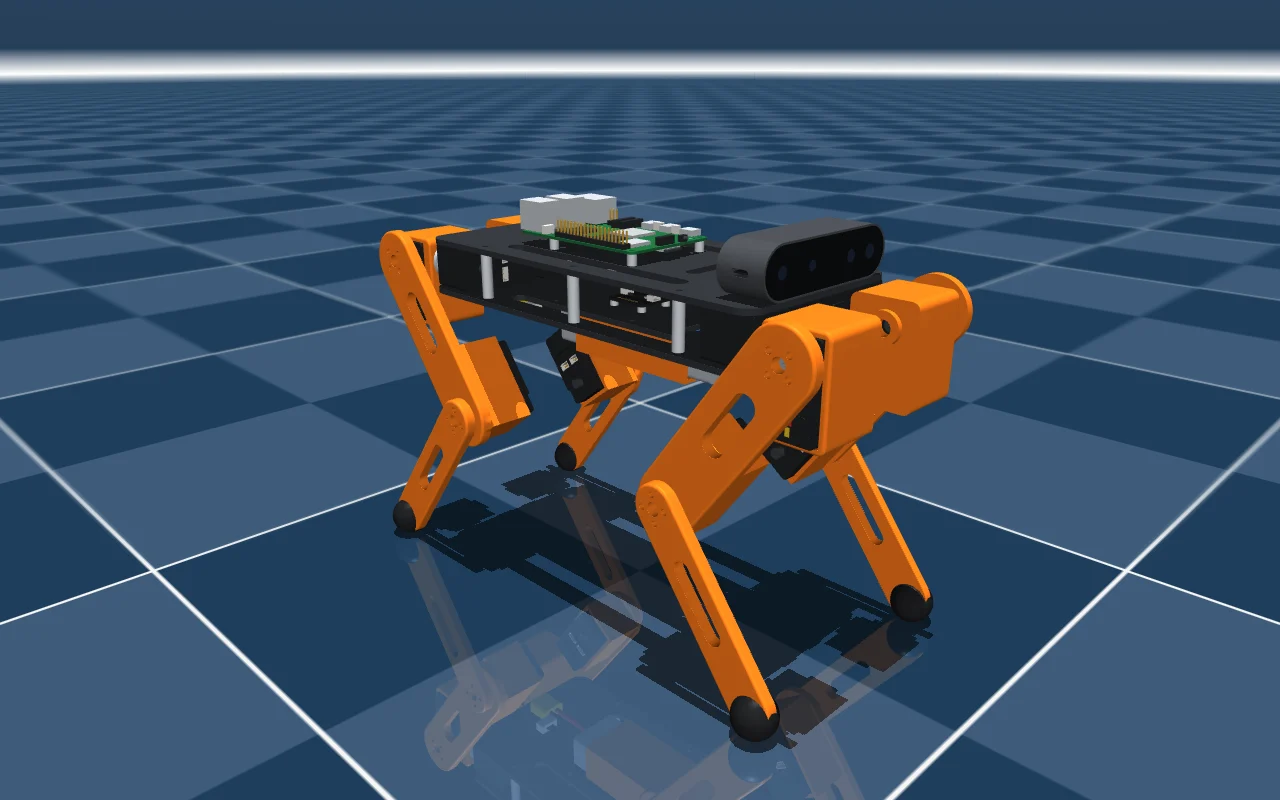
python -m mujoco.viewer --mjcf=robot_dog/scene.xmlscene.xml puts the dog, robot_dog.xml, on a floor with lights. Its body is on a free joint and every joint has a position actuator, so let go at zero it stands: it settles 6 mm in its first second as the actuators take its weight, and after five seconds it has sunk 7 mm and leans 0.1°. The sliders under Control in the viewer’s right-hand panel move the joints. The camera is a MuJoCo camera, which you can look through under Camera in the Rendering section of the left-hand panel, and the IMU is three sensors, imu_accel, imu_gyro and imu_quat.
What was checked
The export below was made from the replay on 11 November 2026 and checked with the tools each format is for:
- ROS 2 Jazzy on Ubuntu 24.04:
check_urdfreads the URDF, 16 links in one tree; the package builds withcolcon; with robot_state_publisher running, every link is reachable through tf2; anddisplay.launch.pyopens RViz (above). - Gazebo Harmonic: its URDF reader keeps every link that moves, both free and welded to the world; the world loads and runs for 8 s, the IMU’s
/imu/dataand the camera’s four topics give messages, andgazebo.launch.pyopens the dog (above). Let go at zero inworld.sdf, Gazebo without ROS, it stands: after 10 s its body has sunk less than 0.1 mm and leans less than 0.1°, every joint held at zero by its position servo. - MuJoCo 3.17: the scene loads with the dog’s 13 bodies, its free joint and 12 hinges, 12 actuators, each one’s range its joint’s limits, the camera and the IMU’s three sensors. Driven through a slow sine for 4 s, nothing goes NaN. Let go at zero on its actuators, it stands, as above: after 5 s its body has sunk 7.1 mm, leans 0.1° and has drifted 0.4 mm, and no joint is more than 6° from zero, which is a position actuator holding against gravity.
- Which way each joint turns, each turned alone in MuJoCo: as the table says.
Download the files
- robot_dog.protojoint.json, 2.0 MB: the design, to open in the editor with Open, change and export again.
- robot_dog.zip, 1.0 MB: the export as it came out, the ROS 2 package with its URDF, SDF, MJCF and 113 meshes, as checked above, with the licence added as
robot_dog/LICENSE.
Both files are under the MIT licence, copyright ProtoJoint AI: use them, change them and share them, commercially too, as long as the copyright line and the licence go with them.
Questions
Does it walk?
Not by itself. The export describes the robot and holds each joint with a position servo; walking takes a gait controller of your own, in MuJoCo’s Python or as ROS 2 controllers, which commands the twelve joints with the signs in the table. The package’s demo:=true swings one joint at a time, to show each one moves.
Can I change the legs?
Yes. Open the design file in the editor (Open), change the thigh or the shin, and export again: every link, joint, mass and mesh is written anew.
Why is the Pi’s mass set by hand?
The parts library gives the servos, the LiPo, the IMU and the camera their makers’ masses, but none for the Raspberry Pi 5, and a part with neither a mass nor a material is counted at 1000 kg/m³, with a warning in the export panel. So 46 g was typed on the Pi’s part. Sellers’ figures for the board differ, and a cooler adds to it: weigh yours and type that.
Sources
- Feetech, 12V 30KG.CM magnetic encoding servo STS3215 (ST-3215-C018), accessed November 7, 2026.
A six-servo desktop arm from CAD to RViz, Gazebo and MuJoCo
Build a six-servo desktop arm in the browser, joint it on the servo axes and export URDF, SDF, MJCF and a ROS 2 package that runs in RViz, Gazebo and MuJoCo, with the model and the files to download.
CAD to URDF
Turn a CAD assembly into a URDF in your browser: links from parts, joints from the assembly, inertia from the exact solids. What goes in, what comes out, and a six-servo arm run in RViz, Gazebo and MuJoCo.
CAD to URDF: eight mistakes and how to catch them
Why a robot from CAD loses links, refuses to load or moves wrong in Gazebo and MuJoCo: inertia, default masses, massless links, frames, closed loops, slider limits and heavy meshes, with the check for each.