Templates · Laser and CNC
Slot-together phone stand
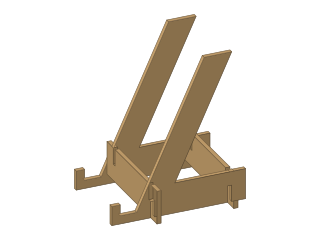
Two sides and two cross bars that slot together without glue; set the lean angle and the phone's thickness.
- phone stand
- tablet stand
- slot joint
- laser
- desk
- gift
- Dwg
- phone-stand
- Params
- 7
- Units
- mm
Parameters
Open in the editor opens the design with these defaults; change them afterwards in Modify › Parameters, and everything that depends on them follows. Opened from the editor’s template library instead (New ▾ › New from template…), the template asks for its values first and checks them against these ranges and against each other, and Copy link gives an address that opens it with your values.
| Name | What it sets | Default | Range |
|---|---|---|---|
width | Stand width | 80 mm | 60 to 160 mm, steps of 1 |
height | Back height | 110 mm | 80 to 170 mm, steps of 1 |
angle | Lean angle (from horizontal) | 65 deg | 55 to 75 deg, steps of 1 |
phone | Phone thickness (with case) | 12 mm | 7 to 20 mm, steps of 0.5 |
lip | Front lip height | 14 mm | 8 to 25 mm, steps of 0.5 |
thickness | Material thickness | 3 mm | 2 to 6 mm, steps of 0.1 |
kerf | Kerf compensation | 0 mm | 0 to 0.4 mm, steps of 0.01 |
Notes
Four flat parts: two identical sides and two identical cross bars. Each bar has two slots cut from its top edge and each side two slots cut from its bottom edge; push the bars down over the sides and the stand is rigid, no glue or screws.
Lean angle is the back's angle from the desk: 60 to 70° suits reading and video calls. Phone thickness is the width of the cradle the phone stands in - measure your phone in its case and add a millimetre. Back height and Stand width size it for a phone or a small tablet; the base grows to keep it from tipping.
Enter the thickness you measure with calipers. Kerf narrows the slots by your laser's cut width so the joints are snug: leave it at 0 if the parts slide together freely, raise it (0.1 to 0.2 mm) if they wobble.
Cut the Side sketch and the Cross bar sketch twice each (right-click the sketch, Save As DXF). Sand the cradle edge if the phone scratches easily.
License: CC0 1.0: no rights reserved.