Templates · Laser and CNC
Open finger-joint tray
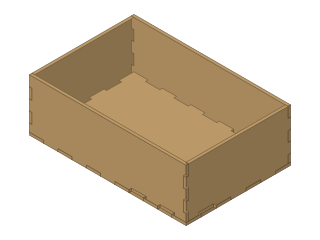
A five-panel open tray with finger-jointed corners and a flush rim, for desk organisers, parts bins and serving trays.
- tray
- box
- finger joint
- laser
- storage
- Dwg
- finger-tray
- Params
- 6
- Units
- mm
Parameters
Open in the editor opens the design with these defaults; change them afterwards in Modify › Parameters, and everything that depends on them follows. Opened from the editor’s template library instead (New ▾ › New from template…), the template asks for its values first and checks them against these ranges and against each other, and Copy link gives an address that opens it with your values.
| Name | What it sets | Default | Range |
|---|---|---|---|
W | Outer width | 180 mm | 60 to 600 mm, steps of 1 |
D | Outer depth | 120 mm | 60 to 600 mm, steps of 1 |
H | Outer height | 60 mm | 30 to 300 mm, steps of 1 |
thickness | Material thickness | 3 mm | 1.5 to 10 mm, steps of 0.1 |
finger | Finger width (target) | 15 mm | 6 to 60 mm, steps of 0.5 |
kerf | Kerf compensation | 0 mm | 0 to 0.5 mm, steps of 0.01 |
Notes
A bottom and four walls joined with finger joints, open at the top. The top edges of the walls are straight, and the front and back walls own the corners, so the rim is flush all round.
W, D and H are the outside sizes. Finger is the width you would like each finger to be; every edge is divided into an odd number of equal fingers as close to it as fits (at least five), shared by the two panels that meet there.
Measure the sheet with calipers and enter that thickness. Kerf widens every tab and narrows every notch by your laser's cut width: 0 gives a slip fit, the real kerf (often 0.1 to 0.2 mm) a press fit.
For a tray that carries weight, glue the joints and sand the rim. To cut it, right-click each panel's sketch in the browser and choose Save As DXF; the front and back are identical, as are the two sides.
License: CC0 1.0: no rights reserved.