Templates · Laser and CNC
Drawer with cabinet
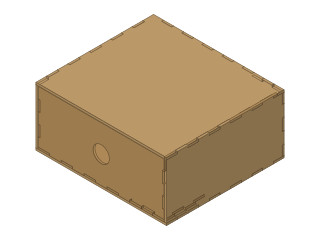
A finger-jointed cabinet open at the front and the drawer that slides into it, sized together from the outside dimensions.
- drawer
- cabinet
- finger joint
- laser
- storage
- desk organizer
- Dwg
- drawer
- Params
- 8
- Units
- mm
Parameters
Open in the editor opens the design with these defaults; change them afterwards in Modify › Parameters, and everything that depends on them follows. Opened from the editor’s template library instead (New ▾ › New from template…), the template asks for its values first and checks them against these ranges and against each other, and Copy link gives an address that opens it with your values.
| Name | What it sets | Default | Range |
|---|---|---|---|
W | Cabinet width | 200 mm | 100 to 500 mm, steps of 1 |
D | Cabinet depth | 180 mm | 100 to 500 mm, steps of 1 |
H | Cabinet height | 90 mm | 60 to 250 mm, steps of 1 |
thickness | Material thickness | 3 mm | 1.5 to 8 mm, steps of 0.1 |
gap | Drawer clearance | 0.5 mm | 0.2 to 2 mm, steps of 0.05 |
finger | Finger width (target) | 15 mm | 8 to 40 mm, steps of 0.5 |
pull | Finger-pull hole diameter | 25 mm | 12 to 35 mm, steps of 0.5 |
kerf | Kerf compensation | 0 mm | 0 to 0.5 mm, steps of 0.01 |
Notes
Ten panels: a cabinet of five (open at the front) and a drawer of five that slides into it. The drawer is sized from the cabinet: as wide as the inside less the clearance on each side, as deep as the inside less the clearance at the back, and as tall as the inside less the clearance at the top. Its front is flush with the cabinet's.
W, D and H are the cabinet's outside sizes. Clearance is the gap on each side and above the drawer: 0.5 mm slides freely in plywood; less fits tighter but may stick when the wood swells. The pull is a round finger hole in the middle of the drawer front.
Measure the sheet with calipers and enter that thickness; Kerf compensates the laser's cut width in every finger joint (0 for a slip fit). Glue the cabinet and the drawer separately, and check that the drawer slides before the glue sets.
To cut it, right-click each sketch in the browser and choose Save As DXF. The cabinet's side sketch is cut twice (left and right), as is the drawer's.
License: CC0 1.0: no rights reserved.