Templates · Laser and CNC
Engraved coaster
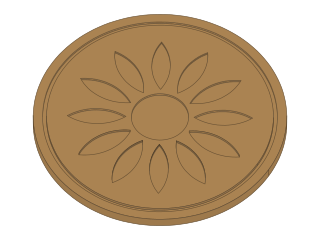
A round coaster with an engraved flower: petals, a centre disc and a ring, the petals as many as you like.
- coaster
- engraving
- gift
- mandala
- laser
- home
- Dwg
- coaster
- Params
- 6
- Units
- mm
Parameters
Open in the editor opens the design with these defaults; change them afterwards in Modify › Parameters, and everything that depends on them follows. Opened from the editor’s template library instead (New ▾ › New from template…), the template asks for its values first and checks them against these ranges and against each other, and Copy link gives an address that opens it with your values.
| Name | What it sets | Default | Range |
|---|---|---|---|
diameter | Diameter | 95 mm | 70 to 130 mm, steps of 1 |
thickness | Thickness | 4 mm | 2 to 8 mm, steps of 0.5 |
petals | Petals | 12 | 6 to 24, steps of 1 |
petalLen | Petal length | 22 mm | 8 to 30 mm, steps of 0.5 |
petalW | Petal width | 7 mm | 3 to 12 mm, steps of 0.5 |
engrave | Engraving depth | 1 mm | 0.4 to 2 mm, steps of 0.1 |
Notes
A round coaster with an engraved pattern: a ring of petals, a disc in the middle and a thin ring near the edge. The pattern is engraved (not cut through), so drinks do not drip through it.
Petals sets how many there are; Petal length and Petal width their size. A petal never grows wider than the space beside it, so with many petals they get slimmer rather than overlap. Engraving depth is how deep the model cuts; on a laser it is set by power and speed, not by the file.
Two sketches export as two layers: Outline (cut it through) and Engraving (engrave or score it). Right-click each sketch and choose Save As DXF, then give them different operations in your laser software. 3 to 6 mm plywood, cork or slate all work; seal wood with oil or varnish.
License: CC0 1.0: no rights reserved.