Templates · Laser and CNC
Cable management comb
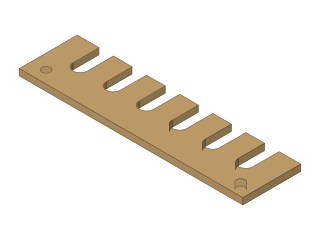
A comb that keeps cables apart and tidy, with round-bottomed slots sized to the cable and screw holes at the ends.
- cable management
- cable comb
- desk
- rack
- laser
- 3d print
- Dwg
- cable-comb
- Params
- 8
- Units
- mm
Parameters
Open in the editor opens the design with these defaults; change them afterwards in Modify › Parameters, and everything that depends on them follows. Opened from the editor’s template library instead (New ▾ › New from template…), the template asks for its values first and checks them against these ranges and against each other, and Copy link gives an address that opens it with your values.
| Name | What it sets | Default | Range |
|---|---|---|---|
slots | Number of slots | 6 | 2 to 16, steps of 1 |
cable | Cable diameter (slot width) | 7 mm | 3 to 12 mm, steps of 0.5 |
pitch | Slot spacing | 16 mm | 10 to 30 mm, steps of 0.5 |
depth | Slot depth | 16 mm | 7 to 40 mm, steps of 0.5 |
spine | Spine height | 12 mm | 6 to 30 mm, steps of 0.5 |
margin | End length | 14 mm | 8 to 30 mm, steps of 0.5 |
hole | Screw hole diameter | 4 mm | 2.5 to 6 mm, steps of 0.1 |
thickness | Material thickness | 3 mm | 2 to 6 mm, steps of 0.1 |
Notes
A flat comb for routing cables neatly - behind a desk, along a server rack, or as a combing tool for a bundle of wires. Every slot has a round bottom the size of the cable, so cables sit in it without being pinched.
Cable diameter sets the slot width: measure the cable and add 0.5 mm for a free fit, or take a little off to grip it. Slot spacing is centre to centre; the comb's length follows the number of slots. The two screw holes are in the ends of the spine, below the slots, for mounting it under a desk.
Laser-cut it from 3 mm plywood or acrylic, or 3D print the outline extruded (it is a single flat part). Export the outline with Save As DXF from the sketch's right-click menu.
License: CC0 1.0: no rights reserved.